Biostar TA780G M2+ Motherboard on AMD 780G Chipset (Socket AM2+)
|
- AMD 780G chipset (AMD 780G Northbridge + SB700 Southbridge)
AMD 780G is a good chipset for well-rigged motherboards designed for entertainment centers, for example, Gigabyte MA78GM-S2H, as well as full-size computers, such as ECS A780GM-A (if you are looking for a motherboard with integrated graphics for a generic computer). But it would have been strange not to see this chipset in classic microATX motherboards with no bells and whistles. Biostar engineers designed such a product, but they included it into the "elite" T-Series instead of a noname family. Let's see what has been done to justify this high status (except for the chipset) of this modest looking motherboard.
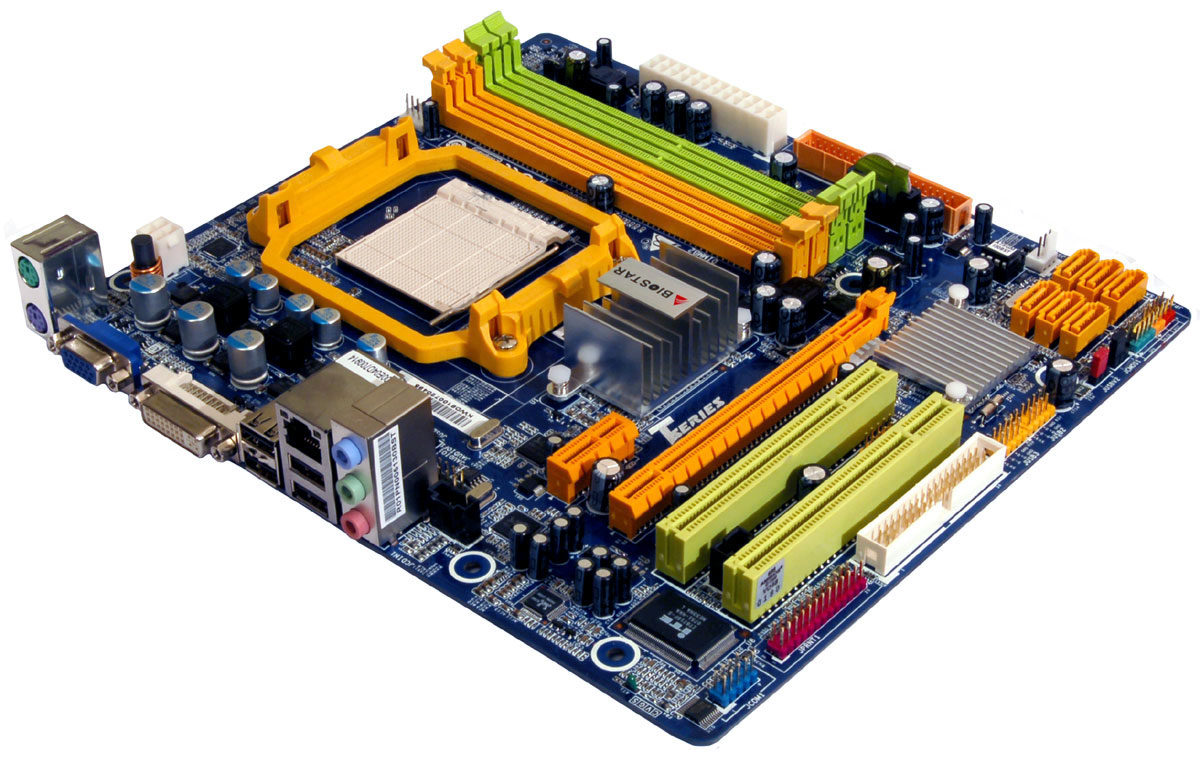
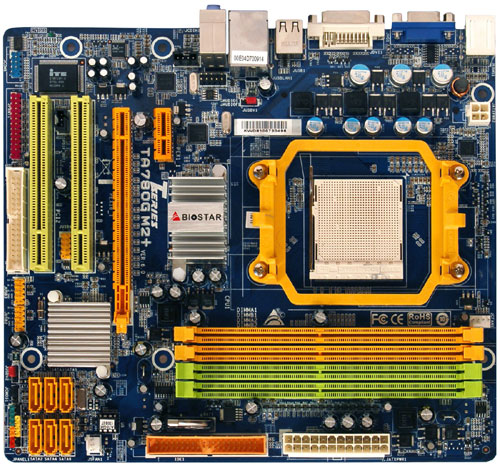 This product is not overburdened with additional controllers, but its layout is very dense, because its dimensions are smaller than those of the standard microATX board. However, it can accommodate a long dual-slot card without blocking any on-board connectors. So this board has a thought-out layout of peripheral connectors. Engineers decided that it was too early to abandon serial and parallel ports yet. But they didn't place them on the rear panel either, having installed corresponding connectors for rear panel brackets behind the last PCI slot. There is also a connector for a floppy drive.
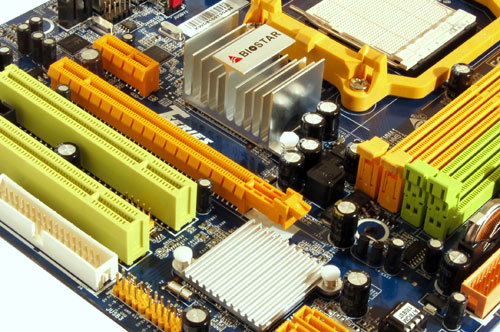 Heat sinks on both bridges seem to agree with the general economical concept. As we have already noted, chipsets with low heat release may come with small heat sinks, and their cooling efficiency will still be sufficient owing to more intensive heat exchange because of the increased temperature difference. In this case, Northbridge has even a larger heat sink than minimally allowed. At least it was warm rather than hot on our sample of the motherboard. However, the motherboard allows to overclock its graphics core. Besides, as any chips, chipsets may differ in heat release within the official TDP range.
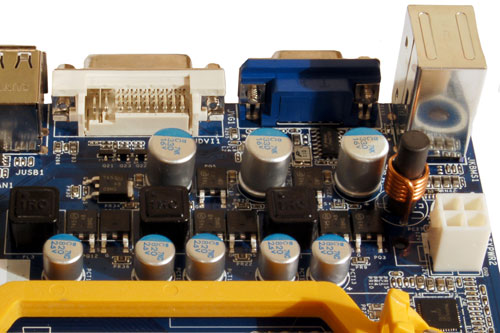 The 3-phase switching voltage regulator of the processor incorporates three field-effect transistors per channel, five 820 uF capacitors and three 330 uF ones (from Panasonic with polymeric electrolyte). All on-board coils are closed, so we heard no motherboard noises during our tests. Despite the modest regulator design, the list of supported processors includes models with maximum TDP=125 W. We tested Athlon 64 FX-62, which proved operability of such configurations. However, you will hardly want to build such unbalanced configuration deliberately. There are no empty seats on the board, because it's currently the only model from Biostar on this chipset. Motherboard dimensions - 245x215 mm (narrow microATX, six-screw mount, one edge of the board with HDD and power connectors is not fixed.
System monitoring (ITE IT8716F-S, according to BIOS Setup):
- Voltages on a processor core, memory, chipset, HT bus, +3.3, +5, +12 V, +5 V Standby and battery
- RPM of two fans
- CPU and board temperatures (by the corresponding embedded sensors)
- SmartFan - automatic rotational speed control for CPU and system coolers. You can influence the standard algorithm of the CPU fan by specifying corresponding values:
- Fan Ctrl Off - the fan stops, when the temperature drops below a specified threshold
- Fan Ctrl On - the fan starts, when the temperature grows (in other words, you can specify different values for starting and stopping the fan, in order to avoid frequent ons/offs)
- Fan Ctrl Start value - a temperature threshold, when the system starts controlling the rotational speed
- Fan Ctrl Sensitive - rotational speed acceleration per 1°C.
You can also control coolers using T-Utility in Windows. System monitoring data are displayed at startup during POST - it's a traditional feature in Biostar motherboards.
Onboard ports, sockets, and connectors
- Processor socket (Socket AM2, Socket AM2+ compatible, officially supports Phenom, Athlon 64/X2/FX, and Sempron processors for Socket AM2 and Socket AM2+, the list of products, tested for compatibility, is published on the web site)
- 4 x DDR2 SDRAM DIMM (up to 16 GB DDR2-400/533/667/800/1066, dual-channel mode is available, if slots are filled symmetrically). If you want DDR2-1066 memory modules (only for Phenom processors), you are recommended to choose them from the list of products tested for compatibility
- 1 x PCIEx16 for a graphics card
- 1 x PCIEx1
- 2 x PCI
- Power connectors: standard ATX 2.2 (24 pins) and 4-pin ATX12V to power a processor
- 1 x FDD
- 1 x IDE (Parallel ATA) for two chipset-based ATA133 devices
- 6 x SATA-II (Serial ATA II) for six chipset-based SATA300 devices, connected drives can form RAID 0, 1, and 0+1
- 3 connectors for rear panel brackets with 6 x USB
- Connector for a bracket with a COM port
- Connector for a bracket with an LPT port
- 1 x CD/DVD audio connector
- Connectors for analog audio ins and outs on the front panel
- S/PDIF-Out connector
- Two fan headers with rpm control, CPU fan header (4 pins) supports smart control (the current BIOS version does not support 3-pin connectors).
Back panel (left to right, blockwise)
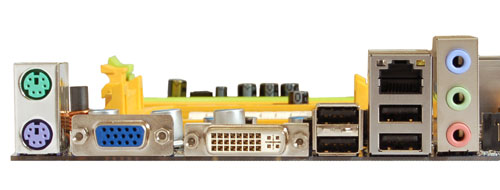 Click for the rear view Click for the rear view
- PS/2 mouse and keyboard
- 1 x DVI-D
- 1 x VGA
- 2 x USB
- 2 x USB and 1 x RJ-45 (Gigabit Ethernet)
- 3 x Analog Audio (Line-In, Front-Out, Mic-In).
Package Contents
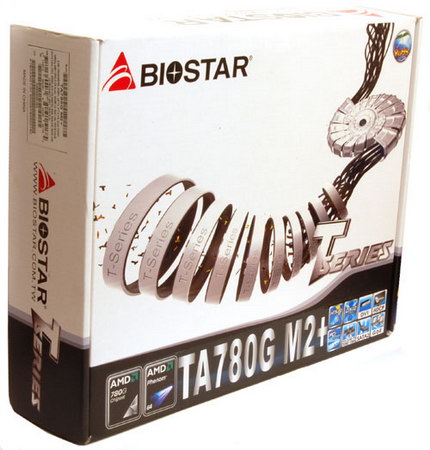
- Package: a standard-sized box in the traditional T-Series style, it's even too big for this motherboard
- Documentation: User manual (the body of the manual is in English, but specifications are published in various languages)
- Cables: 2 x SATA with a power converter for one SATA device, 1 x ATA66, and 1 x FDD cable
- Rear I/O shield
- CD with drivers and T-Utility (to flash CMOS, monitor and overclock the system). Besides, the bundle includes Bullguard Internet Security 6.0.
Integrated Controllers
- Audio, based on the chipset support for HD Audio and Realtek ALC662 codec, 5.1 channel audio, front line-ins/outs, S/PDIF-Out, and CD-In
- Network: Gigabit Ethernet 10/100/1000 Mbps based on PCIE controller Realtek RTL8111C.
The integrated audio quality was tested in 16 bit 44 kHz mode using RightMark Audio Analyzer 6.0.5 and the ESI Juli@ sound card:
| Frequency
response (from 40 Hz to 15 kHz), dB: |
+0.13, -0.17
|
Very good
|
| Noise level,
dB (A): |
-77.4
|
Average
|
| Dynamic range,
dB (A): |
77.6
|
Average
|
| THD, %: |
0.012
|
Good
|
| THD + Noise,
%: |
-71.2
|
Average
|
| Intermodulation
distortion + Noise, %: |
0.032
|
Good
|
| Channel crosstalk,
dB: |
-81.7
|
Very good
|
| IMD at 10
kHz, %: |
0.032
|
Good
|
General performance: Good. The manufacturer decided to save on the audio codec. In combination with notorious Biostar problems with the layout of audio codecs (as a rule, objective tests show a higher noise level than in similar codecs used in motherboards from other manufacturers), it produces mediocre impressions. Audio quality is sufficient for inexpensive small speakers, as the main tests determining subjective impressions (distortions and frequency response) are on the standard level. In other cases you will have to buy a sound card or a bracket for S/PDIF-Out and use the digital connection.
Settings
| Jumpers and switches |
Clear CMOS jumper |
|
| 2 x USBV jumpers |
Wake on USB for rear panel ports
and ports on brackets |
| AMI BIOS v2.61 |
Allows to disable specific CPU functions |
+ |
K8 Cool'n'Quiet
Secure Virtual Machine Mode |
| Memory timings |
+ |
1T/2T Memory Timing, CAS Latency, Min RAS
Active Time, RAS to CAS Delay, Row Precharge Time, Row to Row
Delay, Row Cycle Time, Write Recovery Time, Read-To-Write Time,
Write-To-Read Time, and a wide choice of additional timings |
| Memory frequency selection |
+ |
Auto, 400, 533, 667, 800, 1066 MHz (you
actually specify a divider to the frequency of the built-in memory
controller) |
| HT bus setup |
+ |
Auto, 200, 400, 600, 800, 1000, 1200, 1400,
1600, 1800, 2000, 2200, 2400, 2600 MHz |
| Peripheral bus frequency control |
- |
|
| PCI IRQ manual assignment |
+ |
|
| FSB frequency setup |
+ |
200-600 MHz at 1 MHz steps |
| CPU multiplier |
+ |
from x4 at x0.5 steps |
| CPU core voltage control |
+ |
+0.10-0.30 V at 0.10 V steps |
| Memory voltage control |
+ |
1.95-2.65 V at 0.05 V steps |
| HT bus voltage control |
+ |
1.20-1.50 V at 0.10 V steps |
| Chipset voltage control |
+ |
1.20-1.35 V at 0.05 V steps |
We used BIOS dated 24.03.08, the latest release version. The mentioned BIOS parameters are available in this version, but the viability of non-standard settings hasn't been tested.
The motherboard unexpectedly offers rich overclocking options, but the frugal bundle and rigging are not for overclockers. It looks that the board is included into Biostar T-Series of more expensive motherboards only owing to these advanced BIOS settings.
As is always the case with Biostar, there are three levels of automatic overclocking, which names hint at car engines (V6, V8, and V12) - "Extra, Extreme, and Extraordinary" overclocking levels correspondingly. However, these options did not raise CPU performance in the current BIOS version (at least with our Athlon 64 X2 4000+, all parameters remained on the initial level).
CMOS Backup allows to save BIOS settings into a profile. But it's updated automatically after POST, so you cannot use it to save alternative settings, although this feature used to be available even in cheap motherboards from Biostar. Besides, we didn't find the traditional built-in BIOS flashing utility. Perhaps, it has to do with the upgrade from Award to AMI BIOS.
Overclocking
In order to evaluate motherboard and its BIOS, we overclock our testbed processor to a maximum stable level. We use all features of the motherboard in this test, including raising CPU voltage and adjusting multipliers and frequencies of system and peripheral buses, if necessary. But if, for example, reducing Hyper-Transport frequency does not improve overclocking, we leave the default multiplier. Memory is set to the standard frequency for a given memory module (multiplier correction), if a manufacturer does not publish any ways to improve memory overclocking. Otherwise, we analyze their efficiency as well. In order to evaluate stability of the overclocked system, we load Windows XP and run WinRAR performance test for 10 minutes (Tools - Benchmark and hardware test). As overclocking potential is an individual property of a given motherboard sample to some degree, we don't set the task to determine overclocking potential to within a single MHz. In practice, we are to find out whether CPU overclocking will be limited by a motherboard as well as to evaluate its behavior in non-standard modes, including automatic restoration of a correct frequency after a failed overclocking attempt, etc.
| |
Clock, MHz |
FSB Clock, MHz |
Core voltage (according to system monitoring
in BIOS), V |
HT bus frequency (multiplier), MHz |
| Athlon 64 X2 4000+ (2.0 GHz) |
2600
|
260
|
1.40
|
1300 (x5)
|
This motherboard can be overclocked, although it's apparently not designed to break records here, because of its real technical capacities in the first place - even if its 3-phase voltage regulator copes with the high frequency load, it will certainly work in strained mode. So its users will have to provide good ventilation and probably individual cooling for the on-board voltage regulator.
The integrated graphics core came up with a pleasant surprise - we managed to raise its frequency from 500 MHz to 680 MHz at the stock voltage level. Raising the voltage from 1.15 V to 1.25 V, we unexpectedly managed to reach stable operation at 780 MHz in game tests even without additional cooling. But even in this case our common sense tells us that Northbridge requires additional ventilation, when its voltage is increased.
Performance
Testbed configuration:
- CPU: AMD Athlon 64 X2 4000+
- Memory: 2 x Kingston KHX7200D2K2/1G (DDR2-800, 5-5-5-15-2T)
- HDD: Seagate Barracuda 7200.10 (SATA, 7200 rpm)
- Graphics card: ATI Radeon X1900XTX, 512 MB GDDR3
- PSU: Chieftec CFT-560-A12C
- OS: Windows XP SP2
We compared our motherboard under review with Gigabyte MA78GM-S2H on the same chipset.
| Test |
integrated graphics |
discrete graphics |
| Gigabyte MA78GM-S2H |
Biostar TA780G M2+ |
Gigabyte MA78GM-S2H |
Biostar TA780G M2+ |
| Archiving with 7-Zip, min:sec |
6:42 |
6:53 |
6:40 |
6:42 |
| MPEG4 (XviD) encoding, min:sec |
6:04 |
6:12 |
6:04 |
6:07 |
| Unreal Tournament 2004 (Medium@800x600),
fps |
46.9 |
46.9 |
56.9 |
56.7 |
| Unreal Tournament 2004 (High@1024x768),
fps |
38.0 |
38.0 |
57.0 |
56.7 |
| FarCry (Medium@800x600), fps |
70.0 |
69.0 |
121.7 |
119.4 |
| FarCry (High@1024x768), fps |
48.1 |
47.3 |
121.6 |
119.7 |
| DOOM III (Medium@800x600), fps |
43.1 |
42.6 |
132.7 |
134.7 |
| DOOM III (High@1024x768), fps |
29.8 |
29.4 |
132.0 |
133.4 |
| Company of Heroes (Medium@800x600), fps |
37.9 |
34.9 |
104.9 |
105.7 |
| S.T.A.L.K.E.R. (Medium@800x600), fps |
62.1 |
60.0 |
190.0 |
192.3 |
Computing tests demonstrated higher memory efficiency of the Gigabyte motherboard (both products offer advanced timing settings, but we specify only the main timings, leaving secondary timings for BIOS to decide). A difference is noticeable only with the integrated graphics, and when the graphics core does not affect results. What concerns games, both motherboards perform identically here.
Conclusion
This motherboard is a typical workhorse. Only rich overclocking options in BIOS justify its belonging to T-Series. But they are not enough to put this motherboard in the same price range with Gigabyte MA78GM-S2H, as it happens with the first retail offers. Current prices for motherboards on AMD 780G depend on the time that passes since their release dates rather than on their characteristics. The latest products are often more expensive than older motherboards. But as the market is being filled, prices are rapidly lining up into order. What concerns Biostar TA780G M2+, judging by its characteristics, it should be one of the cheapest products on this chipset.
Official product page.
Motherboard provided by the manufacturer
Dmitry Laptev (lpt@ixbt.com)
May 8, 2008
Write a comment below. No registration needed!
|
|
 |
|
|
|